
Design Fundamentals for the Web: Session 01
Course Overview, Design Process, The Big Idea!
Course Overview
- Introductions
- Review Syllabus
Web Design
Web Design is Multidisciplinary
-
User Experience Design
- Content Development
- Visual Design (UI)
- Usability (UX)
- HTML, CSS, plus some Javascript / Libraries
The Web Design Process
- Identify the types of users you need to communicate with
- Identify what each user type needs to be able to do
- Organize your content semantically
- Compose appropriate structural layouts for your content
- Create visual hierarchies for your content with type
- Apply design principles to emphasize relationships between elements
- Create mood and enhance your visual hierarchies and element relationships using color
- Breath life into your design with behavioral feedback
- Test, rinse & repeat!
The Coding Process
- Open up your favorite text editor. In class, we'll use Visual Studio Code
- Craft your HTML, CSS, & Javascript as LOCAL files (on your computer)
- Validate your HTML & CSS using the W3C validators
- Version control your work!
- Upload the files to the hosting server with your favorite sFTP client
Hosting Your Projects
There are several options for hosting your web projects throughout the semester.
- Your IMM130.com Web Account (Preferred)
- CodePen (Pro = Paid)
- Github Pages (Free)
For your final project, I'd recommend you host on your IMM130.com account or a 3rd Party hosting provider because they will support server-side scripting like PHP, whereas Github Pages doesn't (although there is a workaround for this limitation). These services do keep adding features.
The "Big Idea", User Personas & User Stories
The "Big Idea"
- Think about what kind of website you'd like to create over the semester, the different people you'd like to see it, and how you'd like them to use it.
- This is your "Big Idea" - consider a name for it (i.e. "Google Search") and perhaps a tagline ("Organize the world's information and make it universally accessible and useful.") - Also consider a 30 second "elevator pitch" about your site.
- Types of websites might include: Personal, Political, News / Magazine, Corporate, Crowdfunding, Consultation, Writers, Community Building, Portfolio, Brochure.
- Would not suggest these: "Apps" (though a promo site for the app is good), eCommerce / Stores, Admin / Backend, Dashboards / Monitoring
User Personas
- What are User Personas exactly?
- Review this post about writing user personas.
- Create a document and write a paragraph or two about each of these people who you expect to visit your site. Be as specific as possible; include a picture, a description, and why they're using your website.
- This site has a persona generator. Here's a preview.
- Here's a Google Template I made to consider as a starting point.
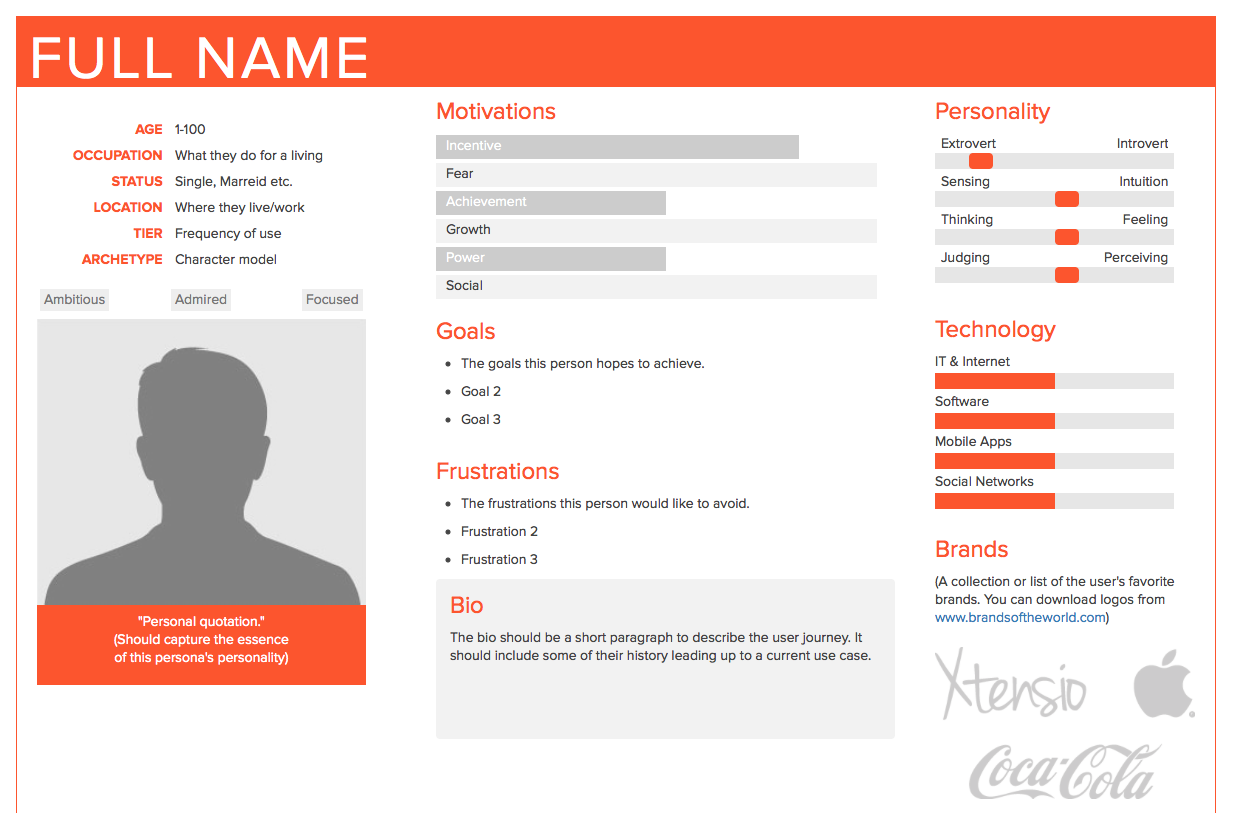
User Stories
- Using your user personas as a guide, try to organize your users into "types".
- Make a list of these user types. You can use a text document or a spreadsheet.
- Now make a second list, this time listing as many user stories as you can.
Think of the user type as a grouping of specific users. As an example, consider a game review / purchase website. You might have a group of users that are "Gamers", divided by age, genre etc. You might also have another group that are "Buyers". This might include users from the Gamers group as well as other users like parents, siblings and friends who could all be potential site visitors but not necessarily Gamers themselves. They just want to use the site to see which games would be appropriate for their children, friends etc. So, our user personas could include people from the both the Gamers and Buyers groups.
The User Stories component simply allows you to view the site from the point of that User Type. For example, "As a young gamer, I want to find out about games in my age range", while another User Story might be from the parent's perspective. "As a parent of an younger tween, I like to purchase an appropriate game in the 10-12 age range".
This should allow you to think about the various users and their group types in order to make sure your site does the things it needs to do; has text content for different reading styles or features like "Search by" or even something like Increase / Decrease font size for older viewers.
Exercise: An Example
Let's work through an example where the designer wanted to create a site for an interactive resume.
Robbi Leonardi’s Interactive Resume
How did he apply a "User Persona"? Who was his target audience? Envision the expectations of the users of his site. This might translate into a "User Story"
Assignment 01
💡 Please follow the guidelines for Assignment Submissions.
Reading
- Chapters 1 & 2 in Design for Hackers
Design
The following 3 parts should be included in a single PDF submission. Be sure to include Your Name and IMM130 project details on the first page of the PDF.
1️⃣ The Big Idea
Create a short description of the type of website you envision building. This is your "Big Idea" - consider a unique name for it. Include it with your PDF. Also suggest giving your site a Name or a Brand. Examples of types of websites include: Personal, Political, News / Magazine, Corporate, Crowdfunding, Consultation, Writers, Community Building, Portfolio, Brochure.
Would not suggest these: "Apps" (though a promo site for the app is good), eCommerce / Stores, Admin / Backend, Dashboards / Monitoring
Be sure to include Your Name and IMM130 project details.
2️⃣ User Personas
- Review these posts: Writing user personas and Beginner's Guide to Marketing User Personas.
- Think about what kind of website you'd like to create over the semester, the different people you'd like to see it, and how you'd like them to use it.
- Create a persona and write a paragraph or two about each of these people. Be as specific as possible; include a picture, a description, and why they're using your website.
- Suggest a minimum of 4 personas. The amount of personas should really be based on the types of users you expect to visit your site - and the types of things they might do at your site.
3️⃣ User Stories
- Using your user personas as a guide, try to organize your users into types / groups.
- You could make a list of these user types in a spreadsheet on Google Drive, MS Excel or similar
- In your spreadsheet, make a second list, this time listing as many user stories as you can.
Assignment Submission
Please follow the guidelines for Assignment Submissions.
After you've created the User Persona / User Story document, email to me as a single PDF at kelterj@tcnj.edu.
If you've created multiple PDFs, please combine them into a single file using any free online PDF merge applications such as: